Welcome
Welcome to R2B2DroidDev. I develop Android apps and paper games. Contact me through gmail, username r2b2droiddev [@] gmail.com.
Use the tabs to get more information about stuff I created. Oh, and feel free to donate cash or coins ;)
You can find me on Facebook as well. There you will find screenshots, game play images, and development notes. Of course you can also go there for questions and comments.
Donate
My free apps are supported by ads. Some apps have a paid version that removes the ads. If you want to support me without buying a paid version, you can always donate some money or cryptocurrency. Donations are a great motivation to publish new apps and to maintain the current apps :)
Cryptocurrency donations (any amount welcome)
- Bitcoin (BTC) donations can be transferred to address: 1PZtEWMQbiHQST9CnwmQdpcwwadZ2ioQnN
- Litecoin (LTC) donations can be transferred to address: LSnNZhqJDfhYUUqFGJ3ZJK1txanHBePC4M
- Dogecoin (Doge) donations can be transferred to address: DRaaT5x17Pzp75wqjfAfqv4h6Mnizcapm7
Bespaar Met Roken (Dutch)
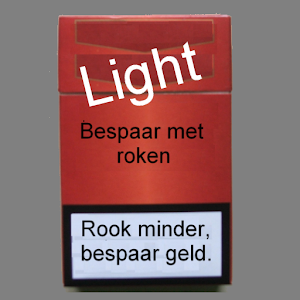
Bespaar Met Roken toont u op heel eenvoudige wijze hoeveel geld u kunt besparen door minder pakjes sigaretten te kopen. Het doet dit door bij te houden hoeveel geld u uitgeeft en hoe dit zich verhoudt tot uw normale gebruik.
Geef eenmalig op hoeveel pakjes u gemiddeld per dag rookt en hoeveel een pakje kost. Kies het aantal dagen waarvoor u de kosten wilt bijhouden. Vervolgens vult u elke keer dat u nieuwe sigaretten koopt het aantal pakjes in. U ziet dan gelijk hoeveel geld u zou besparen als u op dat moment zou stoppen met kopen. Als u dit de hele periode bijhoudt, ziet u aan het eind of u erin geslaagd bent om minder geld uit te geven.
Download via Google Play
Cazboin
In Cazboin, players try to collect as many points a possible. To do so, they draw and play cards that are worth points, including action cards that may affect opponents' points totals. To play a card, players roll a six-sided die to determine which cards they can play, based on a to-play cost.
The game revolves around chance (drawing the best cards), strategy (knowing when to play which action cards), and math (knowing when a certain move is the most effective one to make).
Players draw cards from a single deck and then play cards from their hands to create their own pile of cards, the Stack. At the end of the game, the total value of the stack is the points total for that player. However, by playing action cards players can exchange cards from their own stack with that of an opponent, thereby getting rid of bad cards or stealing good cards. Interaction with stacks is done by Action cards, which have a negative value.
Read more about Cazboin on the blog page.

Easy Searcher
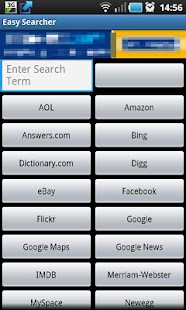
Search 25 sites from just one app. Enter a search term, click the appropriate button, and your search is on its way.
With Easy Searcher, you no longer have to navigate to your favorite site, locate its search box, and then search for stuff. Easy Searcher currently lets you search 25 sites:- Amazon
- Answers.com
- AOL
- Bing
- Dictionary.com
- Digg
- eBay
- Flickr
- Google Maps
- Google News
- IMDB
- Merriam-Webster
- MySpace
- Newegg
- Tumblr
- Veoh
- Viddler
- Wikipedia
- Yahoo
- Yahoo News
- YouTube
Download via Google Play
Makkelijk Zoeken (Dutch)
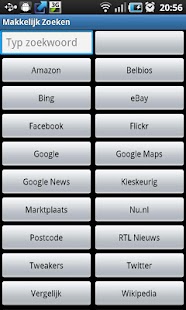
Zoek in 20 sites vanuit een app. Typ een zoekopdracht, klik op de button van de site en zie het resultaat op de webpagina.
Met Makkelijk Zoeken hoef je niet meer zelf je browser te starten, de website in te typen, de zoekbox te zoeken en dan ook nog je zoekopdracht in te voeren. In plaats daarvan heb je, heel makkelijk, een vak voor je zoekopdracht en een knop per website. Typ je opdracht, klik de knop, en Makkelijk Zoeken toont je het resultaat van je zoekopdracht op de site. De 20 sites waar je kunt zoeken zijn:
- Amazon.com
- Belbios
- Bing
- eBay.nl
- Flickr
- Google Maps
- Google News (Nederlands nieuws)
- Kieskeurig
- Marktplaats
- Nu.nl
- Postcode
- RTL Nieuws
- Tweakers
- Vergelijk.nl
- Wikipedia
- Woordenboek
- YouTube
Mis je een site of heb je suggesties? Laat het ons weten.
Download via Google Play
Numbers Addiction
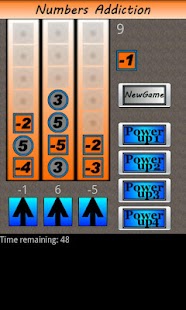
This game gives you random numbers, that you have to distribute over three columns. The object of the game is to place as many tiles as possible. The game ends when all three columns are completely filled with seven tiles.
How to play (brief)
- Get random number tile ranging from -6 to +6
- Put number in one of the three columns
- Get next number tile and put it in a column
- Clear a column by making the total of the combined numbers "0"
- User powerups
- Have fun
How to play (long)
This game gives you random numbers, that you have to distribute over three columns. The object of the game is to place as many tiles as possible. The game ends when all three columns are completely filled with seven tiles.
There are two kinds of tiles: round ones and square ones. The round ones hold "positive" numbers, from 1 to 6. The square ones hold "negative" numbers from -1 to -6. When you put multiple tiles in the same column, the numbers of the tiles add up (or substract) to form a total. When the total for a column equals 0, all tiles are removed from that column. Example: if you play a square -1 and a square -3 (making a total of -4) and then play a round 4, the total becomes 0 and the column is cleared. If you put seven tiles in the same column, without making a total of 0, the column is full and cannot be used again unless you clear it with a powerup.
Note on randomness: Each tile is determined randomly from the range of -6 to 6, with the following constraints: there is no "0" tile, and there will never be more than 4 positive (round) or negative (square) tiles in a row.
Scoring
Each tile placed in a column adds one point to your high score. Clearing a column by reaching 0 adds ten points. Aim for a massive high score.
Powerups
There are four powerups. A powerup is earned by clearing x amount of columns, listed in brackets below.
- Power up 1 (5): "Reroll" gives you a new random number. Note: since this is random, it is possible for the new number to be exactly the same as the old number.
- Power up 2 (10): "Get 8" gives you a posivie (round) tile with the value "8". This is helpful when you filled a column with a huge negative amount.
- Power up 3 (15): "Get -8" gives you a negative (square) tile with the value "-8". This is helpful when you filled a column with a huge positive amount.
- Power up 4 (25): "Clear All" will clear all tiles from all three columns, so you can start over fresh. Your score is not affected.
Game types
Four game types exist, each with their own twist:
- Normal game: the basic form. Easiest to play.
- Extreme game: same as Normal, but totals for columns are not shown. You will have to calculate the totals yourself.
- Insane: totals for columns are not shown. Once a tile is put in a column, you will only see whether it is a positive or negative tile. This means you have to remember all the tiles you played. Or just guess.
- Timed: same as Normal, but with a 60 second timer. Try to stay alive and get as many points in one minute. The game ends after 60 seconds or when you fill all columns, whichever comes first.
Download via Google Play
NumZumZero
NumZumZero is a paper card game. The game play is loosely based on the Android game Numbers Addiction. NumZumZero also has its own dedicated web site, which you can find at http://numzumzero.com.

In NumZumZero, players are dealt cards from two suits, orange and blue. Each card has a face value. The play area consists of three columns and players take turns playing one of their cards in one of the columns. When the total face value of blue cards matches the value of orange cards in the same column, the player who played the last card collects all cards from the column and earns points.

Example: a column holds a blue 1 and a blue 4. Player One adds an orange 3. The total value of all blue cards (5) does not match the total value of all orange cards (3). Player One does not earn any points. Next turn, player Two adds an orange 2. The total value of all blue cards (5) is now equal to the total value of all orange cards (5), so Player Two collects the cards and earns a point. The player with most points at the end of the game wins.

Players also have the option to play a few trick moves. Advanced and Expert game play variations add more strategy and depth to the game, e.g. by assigning bonus points to cards and adding more tricks.
The box contains 4 blank cards with NumZumZero backside to create your own or to replace cards damaged by clumsy players spilling their drinks (trust me, it will happen).
Also available: the NumZumZero Slim Edition. Portable and cheap, great way to expand your game for additional players, or for travel. (Slim Edition doesn not contain rules or Victory Tokens and comes in a regular poker deck box).
Smoke Less Save More
Smoke Less Save More shows you at a glance how much money you can save by buying less packs of cigarettes. To do this, it compares the money you spend on cigarettes with your average cigarette consumption.
The application asks for the number of packs you smoke per day (on average), and the cost per pack. You can then select the number of days to track your expenses. This only needs to be done once. After the initial set up, you simply enter the number of packs bought, whenever you buy new packs. Smoke Less Save More will then tell you how much money you would save if you were to stop buying cigarettes right then. At the end of the time period set by you during setup, you will see if you managed to spend less.
Download via Google Play

Contact
Questions or comments? Contact me through gmail: r2b2droiddev [@] gmail.com.
Credits
Tabs created with SimpleTabs by Fotis Evangelou.